
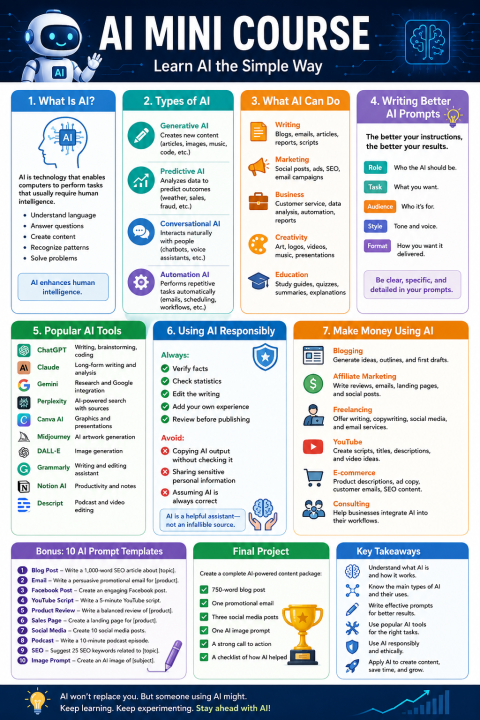
Lesson 1: What Is Artificial Intelligence?
Introduction
Artificial Intelligence (AI) is one of the fastest-growing technologies in the world today. While it may sound complicated, AI is simply computer technology designed to perform tasks that normally require human intelligence. Instead of following only fixed instructions, AI can analyze information, recognize patterns, understand language, and generate useful responses.
Every day, millions of people use AI without even realizing it. When Netflix recommends a movie, Google predicts your search, or your email filters spam, AI is working behind the scenes.
Modern AI tools can also help write articles, create images, summarize documents, answer questions, generate computer code, and even assist with business decisions.
The important thing to remember is that AI is a tool—not a replacement for human creativity and judgment. It works best when people provide clear instructions and review the results.
How AI Works
AI learns from enormous amounts of information called data. Instead of memorizing one answer, it identifies patterns and uses those patterns to generate helpful responses.
Think of AI as a very knowledgeable assistant that has read millions of books and websites. It doesn't "think" like a person, but it can quickly organize information to help solve problems.
Everyday Examples
-
Voice assistants like Siri and Alexa
-
ChatGPT answering questions
-
Google Translate
-
YouTube recommendations
-
Online shopping suggestions
-
GPS navigation
-
Spam filters
Why AI Matters
AI saves time by automating repetitive tasks, helps people create better content, improves productivity, and allows businesses to serve customers more efficiently.
Key Takeaways
-
AI performs tasks that normally require human intelligence.
-
AI learns from patterns in data.
-
AI is becoming part of everyday life.
-
Human judgment is still essential.
Exercise
Write down five ways you already use AI during a normal day.
Lesson 2: Types of Artificial Intelligence
Introduction
Not all AI works the same way. Different types of AI are designed for different purposes. Understanding these categories will help you choose the right AI tool for your needs.
1. Generative AI
Generative AI creates new content.
It can produce:
-
Articles
-
Emails
-
Images
-
Music
-
Videos
-
Computer code
Popular examples include ChatGPT, Claude, Gemini, DALL·E, and Midjourney.
2. Predictive AI
Predictive AI analyzes existing information to forecast future outcomes.
Examples include:
-
Weather forecasting
-
Fraud detection
-
Medical diagnosis support
-
Stock market analysis
-
Customer buying behavior
3. Conversational AI
Conversational AI interacts naturally with people.
Examples include:
-
Customer support chatbots
-
Virtual assistants
-
AI customer service
-
Voice assistants
4. Automation AI
Automation AI performs repetitive business tasks automatically.
Examples:
-
Sending follow-up emails
-
Processing invoices
-
Scheduling appointments
-
Managing workflows
Which Type Should You Use?
If you create content, Generative AI is often the most useful. Businesses may also benefit from Automation AI and Predictive AI for efficiency and planning.
Exercise
Choose one repetitive task in your work or personal life that AI could simplify.
Lesson 3: What AI Can Do for You
Introduction
AI is much more than a chatbot. It can become your personal assistant for writing, research, planning, marketing, and business.
Writing
AI helps create:
-
Blog posts
-
Articles
-
Newsletters
-
Product descriptions
-
Scripts
-
Reports
Instead of starting with a blank page, AI provides a strong first draft that you can edit and personalize.
Marketing
AI can help:
-
Generate social media posts
-
Write email campaigns
-
Create ad copy
-
Suggest SEO keywords
-
Develop marketing plans
Business
Business owners use AI to:
-
Answer customer questions
-
Analyze data
-
Draft proposals
-
Create presentations
-
Organize workflows
Education
Students and teachers use AI to:
-
Explain difficult concepts
-
Summarize textbooks
-
Generate study guides
-
Create quizzes
-
Brainstorm ideas
Creative Projects
AI can also generate:
-
Artwork
-
Logos
-
Videos
-
Music
-
Voice narration
Limitations
AI can make mistakes, misunderstand context, or provide outdated information. Always review important work before sharing or publishing it.
Exercise
List three ways AI could help you save at least one hour each week.
Lesson 4: Writing Better AI Prompts
Introduction
The quality of AI responses depends heavily on the quality of your prompts. A prompt is simply the instruction you give the AI.
Weak Prompt
Write about fitness.
This is too vague.
Better Prompt
Write a 1,000-word beginner-friendly article explaining five simple home workouts for adults over 50. Use headings, bullet points, and a motivational conclusion.
Notice how the second prompt includes the topic, audience, length, and formatting.
The Five-Part Prompt Formula
Role
Tell the AI who it should act as.
Example:
You are an experienced digital marketer.
Task
Describe what you want created.
Example:
Write a blog article.
Audience
Specify who will read it.
Example:
For beginners.
Style
Choose the tone.
Examples:
-
Friendly
-
Professional
-
Educational
-
Conversational
Format
Request headings, tables, bullet points, FAQs, or summaries.
Improving AI Responses
If the first answer isn't perfect, don't start over. Instead, ask AI to:
-
Expand section three.
-
Simplify the language.
-
Add examples.
-
Rewrite in a friendly tone.
-
Include SEO keywords.
-
Shorten the introduction.
Exercise
Rewrite a simple prompt into a detailed prompt using the five-part formula.
Lesson 5: Popular AI Tools
Introduction
Hundreds of AI tools are available today. Each specializes in different tasks.
ChatGPT
Excellent for:
-
Writing
-
Brainstorming
-
Research
-
Coding
-
Marketing
-
Business planning
Claude
Known for handling long documents and thoughtful writing.
Gemini
Strong integration with Google services, making it useful for research and productivity.
Perplexity
Combines AI responses with web-based sources, making it useful for fact-finding and current information.
Canva AI
Helps create:
-
Social media graphics
-
Presentations
-
Marketing materials
-
Posters
DALL·E and Midjourney
Designed for generating images from text descriptions.
Grammarly
Uses AI to improve grammar, spelling, punctuation, and writing clarity.
Choosing the Right Tool
Ask yourself:
-
Do I need text?
-
Do I need images?
-
Do I need research?
-
Do I need automation?
Select the tool that best fits the task.
Exercise
Choose one AI tool you have never used before and explore its main features.
Lesson 6: Using AI Responsibly
Introduction
AI is incredibly helpful, but responsible use is essential. Good results come from combining AI assistance with human oversight.
Verify Information
AI may occasionally produce inaccurate or outdated information. For important topics—especially medical, legal, or financial—confirm facts with reliable sources.
Protect Privacy
Avoid entering confidential information such as passwords, banking details, or private business data into public AI tools unless you understand how the service handles your data.
Avoid Plagiarism
Use AI to generate ideas and drafts, but revise the content in your own words and add your own insights and experiences.
Be Transparent
If AI helped create content for work or school, follow any applicable policies about disclosure.
Think Critically
Ask yourself:
-
Is this accurate?
-
Does it make sense?
-
Is anything missing?
-
Does it reflect my own voice?
Exercise
Review an AI-generated paragraph and identify three improvements you would make before publishing it.
Lesson 7: Making AI Work for Your Business
Introduction
AI can help you work more efficiently, improve consistency, and free up time for higher-value tasks. Whether you run a business, create content, or manage a side project, AI can become part of your daily workflow.
Content Creation
Use AI to:
-
Brainstorm topics
-
Draft blog posts
-
Write newsletters
-
Create social media content
-
Generate podcast outlines
-
Develop video scripts
Marketing
AI can assist with:
-
Email campaigns
-
Landing page copy
-
SEO optimization
-
Advertising headlines
-
Calls to action
-
Customer follow-up messages
Customer Support
Businesses use AI to:
-
Answer frequently asked questions
-
Route customer inquiries
-
Draft support responses
-
Create knowledge-base articles
Planning and Organization
AI can help organize projects by creating:
-
Checklists
-
Meeting agendas
-
Action plans
-
Content calendars
-
Standard operating procedures (SOPs)
Building a Daily AI Habit
A simple routine might look like this:
-
Spend 10 minutes brainstorming ideas with AI.
-
Draft one piece of content.
-
Edit it with your own knowledge and voice.
-
Fact-check important claims.
-
Publish or schedule the finished content.
Over time, this workflow can help you produce more consistent, higher-quality work without sacrificing originality.
Final Project
Create a complete AI-powered content package that includes:
-
A 750-word blog post
-
One promotional email
-
Three social media posts
-
One AI image prompt
-
A call to action
-
A checklist describing how AI helped you complete each step
Course Wrap-Up
Congratulations! You now understand the fundamentals of AI, how to communicate effectively with AI through prompts, how to choose the right tools, how to use AI responsibly, and practical ways to integrate AI into your personal or professional projects. The most effective way to continue learning is through regular practice—experiment with prompts, refine the results, and combine AI's speed with your own creativity and expertise.
Tim Moseley